CardRunner for iPhone and iPad
Move photos from your camera to your phone—right in the field.
CardRunner turns your iPhone or iPad into a fast photo import station. Bring in a whole card for free, find your keepers, and send them to your Camera Roll, an editor, or a client without waiting to get back to your desk.
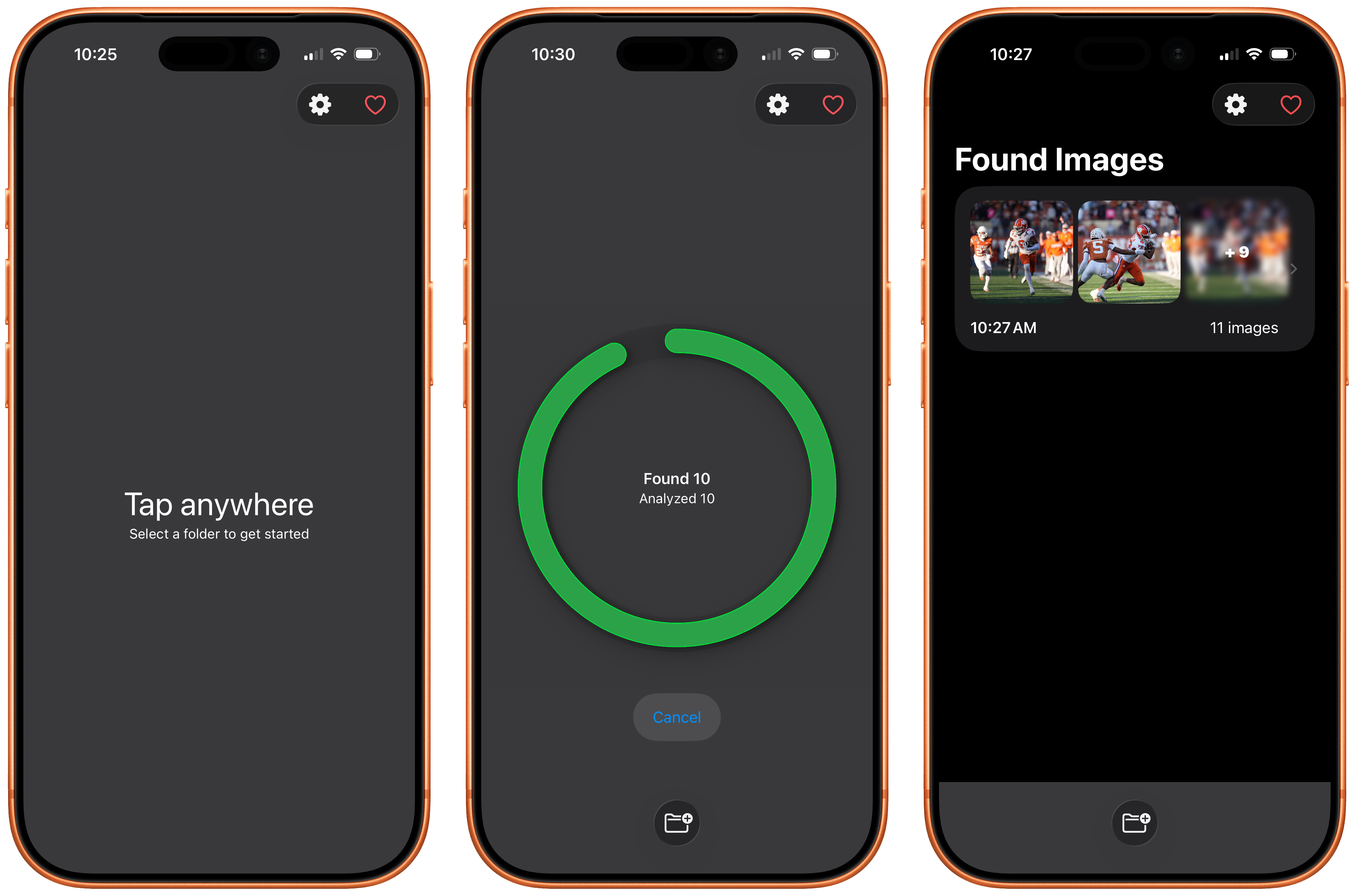
How it works
- Connect. Plug your camera or memory card into your iPhone or iPad. CardRunner detects it automatically.
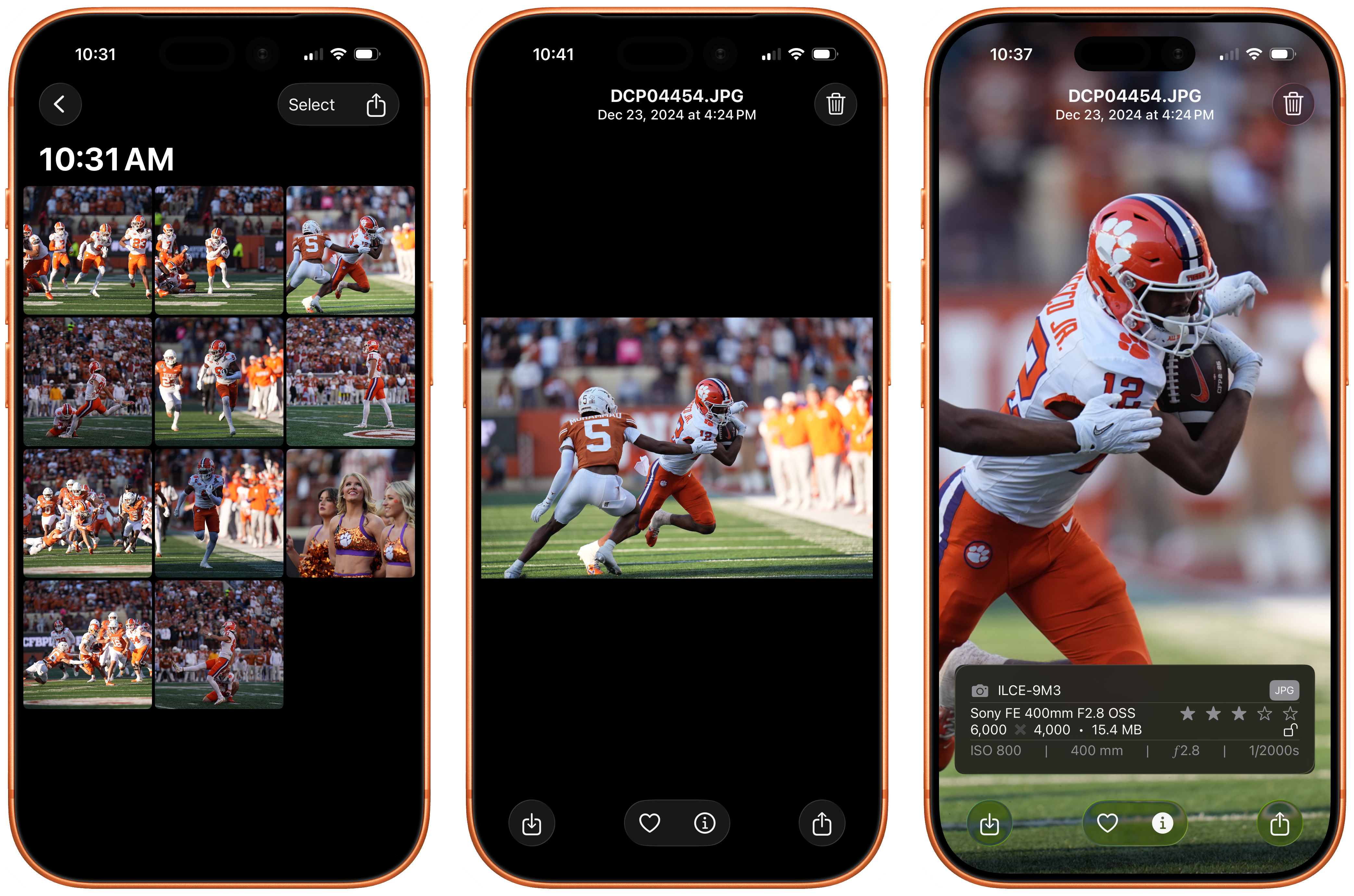
- Browse and choose. See thumbnails immediately, inspect EXIF, mark favorites, or use Pro filters for rated and protected photos.
- Send. Save full-size or optimized copies to your Camera Roll, or stream selects to an editor or client through Photostream.
For fast field selects
Review and share while you are still on location—no laptop or desktop workflow required.
For the whole card
Import unlimited photos for free, then keep the originals in full size or optimize copies for quicker transfers.
For live collaboration
Join a Photostream session with a simple code and let an editor receive photos as you work.
Everything you need in the field
- Unlimited imports, free — Bring over as many photos as you want.
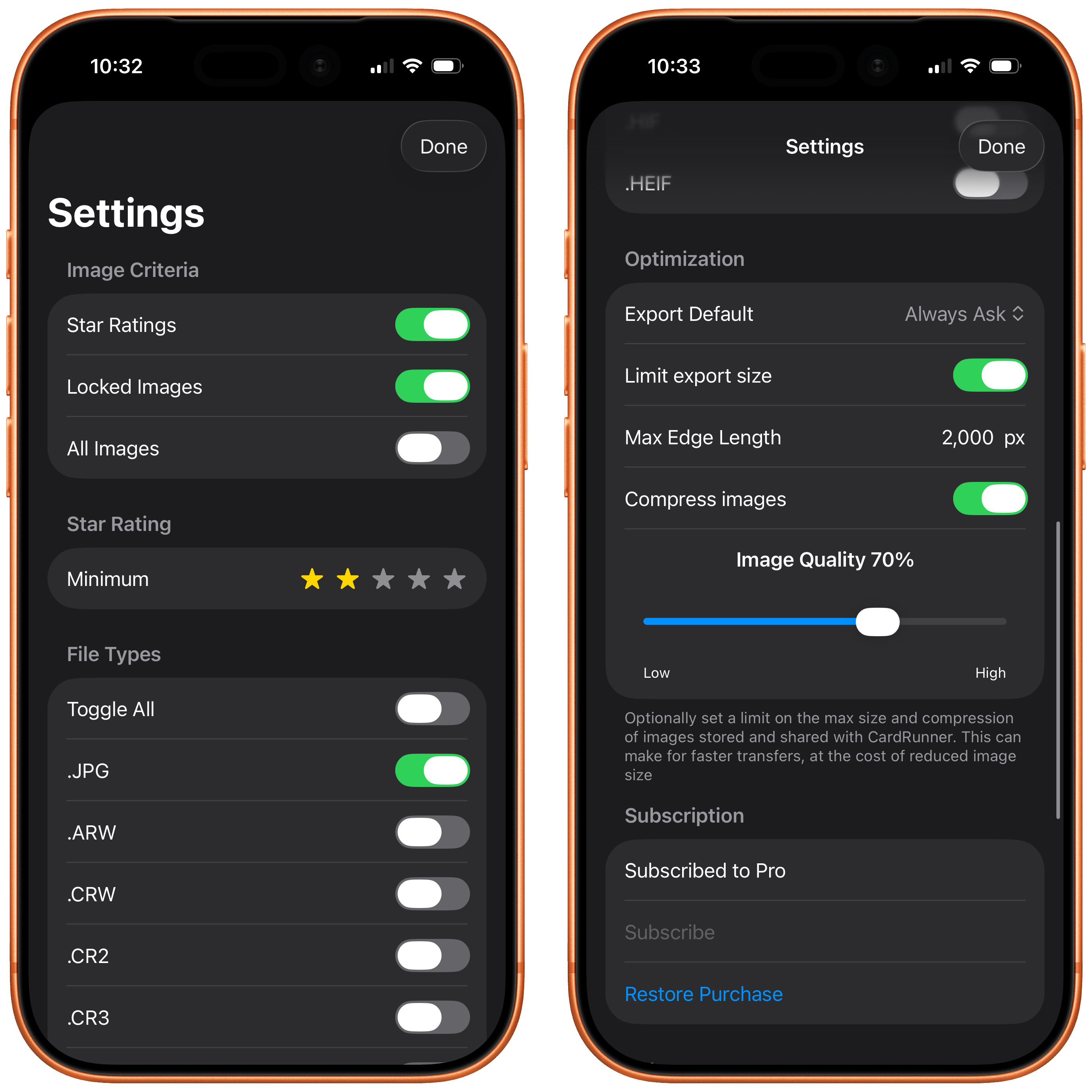
- Selective imports with Pro — Pull only rated, protected, or matching selects.
- RAW support with Pro — Import and export ARW, CR2, CR3, NEF, ORF, PEF, RW2, and more.
- Details at a glance — View camera, lens, ISO, aperture, shutter speed, and other EXIF data.
- Favorites and widget — Mark your best shots and keep them close on your home screen.
- Made for iPhone and iPad — A native workflow on either device.
Screenshots
View screenshots
For live delivery
Meet Photostream
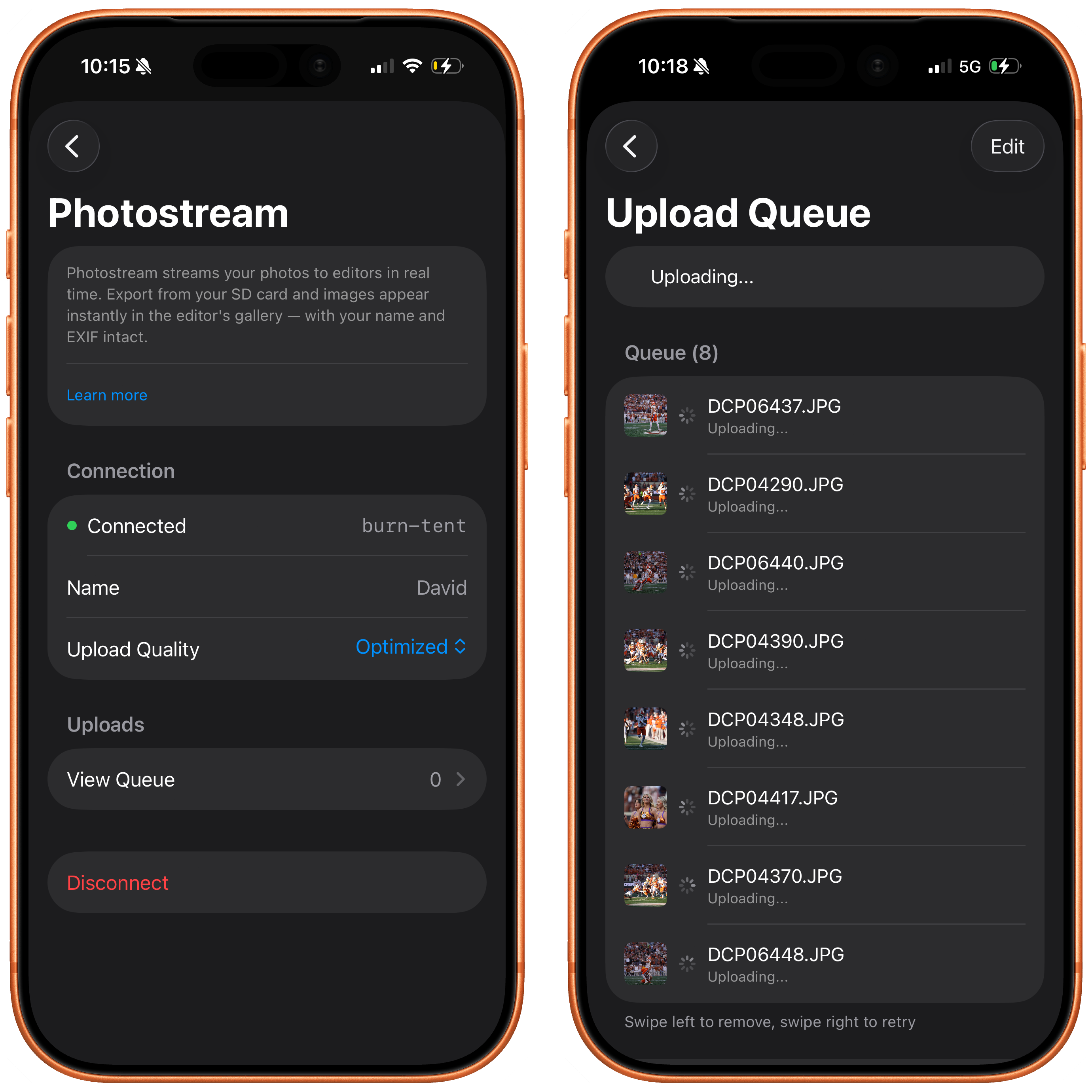
Photostream is the live delivery workspace for your shoot. Connect CardRunner to an event and newly imported photos appear in your editor's gallery in real time, with your photographer name and EXIF metadata intact.
It is a simple way to keep an editor moving, give a client a live look at the work, or deliver selects before you leave the location.
Connect with a join code
- Ask your event organizer or editor for the word-pair join code, such as
BLUE-HAWK. - In CardRunner, open Settings → Photostream.
- Enter or paste the code, then tap Join Photostream.
While connected, CardRunner sends new imports to that event and unlocks every CardRunner feature for the session—including selective imports, RAW support, geotagging, and optimized export controls.
Start free. Upgrade when you need more control.
Free
Unlimited photo imports, browsing, favorites, EXIF viewing, Camera Roll saves, and sharing.
CardRunner Pro
Rated-only and protected-only imports, RAW support, geotagging, and optimized export controls.
Photostream-connected sessions unlock Pro features automatically.
Your support helps fund development and supports my family — thank you!
Privacy Policy
This policy describes the information Platt Solutions, LLC may receive from CardRunner users and how that information is handled.
CardRunner's local import and organization features keep your photos, metadata, and settings on your device. If you choose to connect to Photostream, the images and metadata you send are uploaded to the event you joined so an editor can receive them in real time.
Subscription management is handled by Apple through the App Store. We do not have access to your payment information.
Anonymous crash and usage signals may be collected to improve app quality. No ad networks are used.
Questions or comments
If you have questions or comments about this privacy policy, please contact david [at] platt.ing.
End User License Agreement (EULA)
This Agreement is a legal agreement between you ("User") and Platt Solutions, LLC ("Company") for the use of the CardRunner application ("App") on iOS. By using the App, User agrees to be bound by the terms and conditions of this Agreement.
Acknowledgement
User acknowledges that this Agreement is concluded between User and Company only, and not with Apple, and that Company, not Apple, is solely responsible for the Licensed Application and the content thereof.
License Grant
Company grants User a non-exclusive, non-transferable license to use the App on any Apple-branded products that the User owns or controls and as permitted by the Usage Rules set forth in the Apple Media Services Terms and Conditions.
Maintenance and Support
Company is solely responsible for providing any maintenance and support services with respect to the App. User acknowledges that Apple has no obligation whatsoever to furnish any maintenance and support services with respect to the Licensed Application.
Warranty
Company is solely responsible for any product warranties, whether express or implied by law, to the extent not effectively disclaimed. In the event of any failure of the App to conform to any applicable warranty, the User may notify Apple, and Apple will refund the purchase price for the App to that User; and, to the maximum extent permitted by applicable law, Apple will have no other warranty obligation whatsoever with respect to the App.
Product Claims
User acknowledges that Company, not Apple, is responsible for addressing any claims relating to the Licensed Application or the User's possession and/or use of it, including: (i) product liability claims; (ii) any claim that the Licensed Application fails to conform to any applicable legal or regulatory requirement; and (iii) claims arising under consumer protection or privacy legislation.
Intellectual Property Rights
User acknowledges that, in the event of any third-party claim that the Licensed Application infringes that third party's intellectual property rights, Company, not Apple, will be solely responsible for the investigation, defense, settlement, and discharge of any such claim.
Legal Compliance
User represents and warrants that (i) they are not located in a country subject to a U.S. Government embargo or designated as a "terrorist supporting" country; and (ii) they are not listed on any U.S. Government list of prohibited or restricted parties.
Developer Contact
Questions, complaints, or claims should be directed to: Platt Solutions, LLC — david [at] platt.ing
Third Party Terms
User must comply with applicable third-party terms of agreement when using the App.
Third Party Beneficiary
User acknowledges and agrees that Apple, and Apple's subsidiaries, are third-party beneficiaries of this Agreement, and that upon acceptance of these terms, Apple will have the right to enforce this Agreement against the User as a third-party beneficiary thereof.